Gemoji - Emoji Maker Sticker
- 4.6
- Rating
- 500.00K
- Installs
- Free
- Price
 Analysis by App-foxy
I approached Gemoji - Emoji Maker Sticker as a personalization app rather than a simple collection of decorative images. Its main appeal is the chance to build an emoji that feels more deliberate than picking the first reaction icon in a keyboard. After spending time with it, I found the experience most useful when I wanted a small visual identity for messages, profiles, jokes, or casual creative projects without learning a full design program.
The app is free, belongs to the personalization category, and is made by Tank Game Inc. It is aimed at Teen users, so it feels better suited to older children, teenagers, and adults than to very young users who may need supervision. The current version is 1.2.08.17, and it works on Android 7.0 or later. Those details matter if you are using an older phone or deciding whether this is appropriate for a shared family device.
My overall impression is positive, but not unconditional. The creative idea is easy to understand, and the visual focus makes the app inviting. At the same time, an emoji maker can become frustrating if controls are cramped, if visual choices are difficult to distinguish, or if the result is less useful outside the app than it first appears. I therefore paid particular attention to how readable the interface felt, how manageable the editing process was, and whether the app made sense in real situations rather than only in a quick store preview.
You May Also Like

 Blood Strike: 2.5 Anniversary
Blood Strike’s Loadouts Turn Every Drop Into a Tactical Gamble
A close look at Blood Strike’s custom loadouts: how fast access to signature weapons reshapes its battle royale rhythm, rewards preparation, and narrows the gap between fights.

 Pandora - Music & Podcasts
Pandora’s Music Is Easy to Start, but Harder to Recover
Pandora’s strength is its low-effort path from a seed to a station. Its weak spot is how much confidence it asks you to place in connection, setup, and quiet recovery.

 8 Ball Pool
 Is Built on Rivalries, Rematches, and Routine
A close look at the rivalries, rematches, shared routines, and unanswered safety questions that turn a quick pool match into a persistent mobile community.

 Samsung Music
’s Quiet Strength Is Playing What You Already Own
Its reach comes less from spectacle than from dependable access to a personal library. That simplicity is both the app’s strongest retention engine and its ceiling.

 AccuWeather: Weather Radar
AccuWeather Review: A Quick, Clear Forecast for Everyday Decisions
For everyday plans, the best forecast is the one you can understand quickly. AccuWeather makes rain timing, radar, and local conditions easy to act on, with a few trade-offs.

 Hill Climb Racing
Why Hill Climb Racing Still Turns Crashes Into One More Run
A tiny car, a bumpy hill and one more upgrade: Hill Climb Racing keeps resurfacing because its simple chaos makes every near-miss feel personal.
More From Our News Desk



How the editing experience feels in everyday use
I find the editing experience easiest to enjoy when I treat it as a focused creative break, rather than a task I need to finish perfectly in one sitting. Keeping a simple idea in mind helps me make deliberate choices and spot when extra detail is making the design harder to read. That naturally raises a practical question: which everyday situation gives a custom emoji the most value?
Readability and navigation come first
The strongest part of the experience is that the purpose is immediately clear: you are there to create a personal emoji. That focus is valuable because many personalization tools bury their main action beneath galleries, recommendations, or unrelated settings. Here, the creative task remains the center of attention, which makes the first session less intimidating for someone who does not normally use design apps.
I found the visual approach more approachable than a conventional illustration editor. A full drawing application expects you to understand layers, brushes, canvas sizes, and export choices. Gemoji is better suited to someone who wants to assemble an expressive character or sticker-like image without starting from a blank page. That difference is important for users who may have the imagination for a design but not the patience for technical tools.
The app’s store rating is 4.6 from roughly 6,100 ratings, with around 218 written reviews. I would not treat that as proof that every person will find the editor comfortable, but it does suggest that the basic concept connects with a substantial group of users. My own experience supports that general appeal: the learning curve is gentler than it would be with a general-purpose graphics app.
Navigation is easiest when I treat each design as a small decision-making exercise rather than trying to explore everything at once. I start with the main visual idea, make one change at a time, and pause to inspect the result before continuing. This sounds simple, but it prevents a common problem in character editors: losing track of which alteration made the design feel cluttered or unbalanced.
A useful habit is to decide what the emoji needs to communicate before choosing details. If I want a friendly reaction, I focus on the face and expression first. If I want a recognizable personal mascot, I give more attention to the combination of appearance and accessories. This workflow reduces visual overload and is especially helpful for users who find large collections of choices tiring to scan.
Visual clarity and different ways of noticing detail
Because the product is built around images, visual clarity affects almost every part of the experience. People with strong eyesight will probably understand the design process quickly, but users with reduced vision may need to rely on the phone’s own display settings, zoom tools, or larger system text where those changes are supported. I would not describe the app as a specialist accessibility tool; its inclusive value comes more from its simple creative purpose than from dedicated assistance features.
Contrast can also influence whether two choices feel meaningfully different. Similar shades, small decorative elements, or subtle facial changes may be easy to overlook, particularly on a smaller screen or in bright outdoor light. When I am working in those conditions, I make broad choices first and leave fine adjustments until I can view the screen comfortably. That is a practical way to avoid judging a design from details that are barely visible.
There is another readability issue that is easy to miss: an emoji can look clear while editing but become ambiguous when seen quickly in a busy chat. I recommend checking the finished character at the size you are likely to use it. A tiny expression or accessory may disappear when reduced, while a strong silhouette and a clear face usually remain understandable. This is one of the app’s biggest creative trade-offs: more detail can make the design feel personal, but less detail often makes it communicate better.
For users who process information better through a calm, focused screen, the narrow purpose is helpful. There is less conceptual work than in a drawing suite. On the other hand, anyone who depends on spoken descriptions, highly structured labels, or nonvisual editing should be cautious. The core task is visual, and I would not choose it expecting a fully equivalent experience without additional phone-level support.
Motor comfort, precision, and sensory load
Creating an emoji involves repeated taps and visual adjustments, so motor comfort matters. The app is a better match for people who can make ordinary touchscreen selections than for someone who needs large, widely spaced controls or hands-free operation. I did not find the concept physically demanding, but precision can become important when a design depends on a small choice or a subtle placement.
My advice is to use a stable grip and work in short sessions rather than trying to perfect a character while holding the phone awkwardly. This is particularly useful for users with hand fatigue or tremor. A short pause between changes also helps distinguish whether a selection was intentional or simply the result of an accidental tap.
One non-obvious strength is that the app can turn a potentially open-ended design task into a sequence of manageable choices. That can be easier for users who become overwhelmed by a blank canvas. I would begin with one recognizable feature, such as an expression or a defining visual element, then build around it. The result is usually more coherent than making many rapid changes across the whole character.
Sensory preferences deserve attention too. A colorful personalization app may be enjoyable for someone who likes visual variety, but tiring for someone sensitive to busy screens or frequent changes in appearance. I found it more comfortable to decide on a limited visual theme before editing. For example, choosing a restrained palette and a simple expression can make the session feel calmer while still producing something distinctive.
The Teen content rating is another reason I would treat the app as a creative tool for older users rather than an automatic choice for children. The rating does not tell me how every design will be used in conversation, and a custom emoji can carry meanings that vary between families, schools, and online communities. Adults choosing it for a younger user should look at the finished creations and the way they are shared, not just the editor itself.
Where it fits in real situations
The most convincing use case is casual communication. I can imagine making a character for a group chat, a recurring reaction, or a playful response that feels more personal than a standard emoji. It is also useful for someone who wants a consistent visual style across informal messages without committing to a larger illustration project.
Consider a realistic everyday situation: I am organizing a small event with friends and want a recognizable image for reminders in a chat. Instead of sending the same generic symbol repeatedly, I can create a character with a consistent expression and use it as a visual cue. The benefit is not professional branding; it is quick recognition and a little personality. If the design is too detailed, however, it may lose that advantage when people see it at a small size.
Another good situation is experimenting with self-expression. Someone who feels that ordinary emoji do not quite match their humor, appearance, or mood may enjoy building a closer approximation. This can be especially appealing when the user wants something playful but does not want to publish a photograph or create a polished avatar in a social network.
It is less convincing as a replacement for professional sticker production. If your goal is a carefully controlled brand asset, a transparent export workflow, exact dimensions, or detailed typography, I would choose a dedicated graphics application instead. Gemoji’s value is speed and approachability, not the control expected from a design workstation.
The app has attracted over 100,000 installs, which makes it more than an obscure experiment, but its popularity should not be confused with universal suitability. A person looking for expressive customization may find it worthwhile, while someone who only wants a few ready-made emoji may get more convenience from the keyboard or messaging service they already use.
Sharing, repetition, and the limits of personalization
The practical question after creating an emoji is what happens next. A design has value only if it can fit into the user’s normal communication habits. I would think about the destination before spending too long refining it. If the intended use is a chat, readability at a glance matters more than tiny decorative choices. If the purpose is a profile image or a personal collection, I can afford to be more experimental.
This leads to a useful trade-off between uniqueness and flexibility. A highly specific character may feel more like “you,” but it may also suit fewer conversations. A simpler design can work as a reaction in many contexts. I prefer making one versatile base character first, then creating variations around a few moods. That approach saves time and avoids rebuilding the same visual idea from the beginning.
I also recommend keeping expectations realistic about the difference between making and using an emoji. The creative process is the app’s central attraction; it does not automatically make every result as convenient as a built-in keyboard emoji. Depending on how you communicate, you may need an extra step to use a custom creation. Users who want instant, one-tap reactions in every app may therefore prefer the standard keyboard, while users who value originality may accept a little more effort.
Compared with avatar makers, this app feels more focused on the expressive symbol itself than on representing a complete social profile. Compared with sticker packs, it offers more personal involvement but less immediate convenience. Compared with drawing software, it lowers the technical barrier but also narrows the level of control. I see that middle position as its identity: it is for people who want to make something personal without turning the task into a serious design project.
Remaining barriers before you commit
The main barrier is that the experience depends heavily on visual interaction. If you need robust screen-reader guidance, keyboard-first control, voice operation, or highly predictable nonvisual feedback, I would not assume the app will meet those needs. The same caution applies to users who require unusually large touch targets or very low visual complexity.
A second barrier is decision fatigue. “Endless” creative possibility sounds attractive, but a wide range of choices can make it harder to settle on a finished design. I get better results by setting a small brief: one mood, one main color direction, and one memorable feature. This is not a limitation of the concept so much as a way to keep the concept manageable.
A third issue is context. A custom emoji that feels funny among close friends may be confusing in a school, workplace, or mixed-age conversation. The Teen rating should encourage thoughtful use, especially when designs are shared beyond a private group. I would avoid assuming that a visual symbol has the same meaning for everyone.
Older Android users should also check compatibility before planning around the app, since Android 7.0 is the minimum operating system. On a phone that is already slow or has a small display, editing may feel less comfortable than it does on a newer device. That is not a reason to dismiss the app, but it is a good reason to test the basic workflow before investing time in a large collection of designs.
Finally, the free price makes trying it low-risk, but free does not mean friction-free. Your time is still the resource being spent. If you only want occasional reactions, a built-in emoji keyboard is faster. If you want polished, reusable artwork, a more advanced editor is likely the better investment. Gemoji makes the most sense between those two extremes.
My inclusive verdict
I would recommend Gemoji to anyone who wants a friendly, visual way to create personalized emoji and who is comfortable working primarily through a touchscreen. Its best quality is not simply that it produces colorful designs; it gives a non-designer a clear reason to experiment. The focused concept can reduce the intimidation that comes with a blank canvas, and a thoughtful workflow can make the process comfortable even when too many choices initially feel distracting.
For accessibility, my verdict is measured rather than sweeping. The app can support different abilities and contexts when users combine it with their phone’s display and interaction settings, choose simpler designs, and work at a comfortable pace. It should not be treated as a dedicated accessibility solution, and people who rely on nonvisual or hands-free control should investigate the actual interaction experience on their device before depending on it.
I especially like the idea of creating a versatile base character, checking it at a small size, and then making only a few mood variations. That method gives the app a practical role instead of leaving it as a one-session novelty. It also exposes the central compromise clearly: the more personal the design becomes, the more important it is to keep its expression readable.
With a 4.6 average and a growing user base, the app has clearly found an audience, and I understand why. Still, I would skip it if my priority were instant keyboard access, professional graphic control, or a fully nonvisual editing path. For casual personalization, private jokes, expressive messaging, and low-pressure creative play, it is a worthwhile free download. Its real strength is making personal expression feel approachable, while its real weakness is relying on visual and touchscreen comfort.
In short, I see Gemoji as a pleasant middle ground: more personal than standard emoji, easier than a drawing program, and more hands-on than a ready-made sticker pack. If that balance matches what you want, I think you will enjoy exploring it. If your needs are more technical or accessibility-specific, another tool may serve you better.
FAQs for Gemoji - Emoji Maker Sticker
01What is Gemoji - Emoji Maker Sticker?
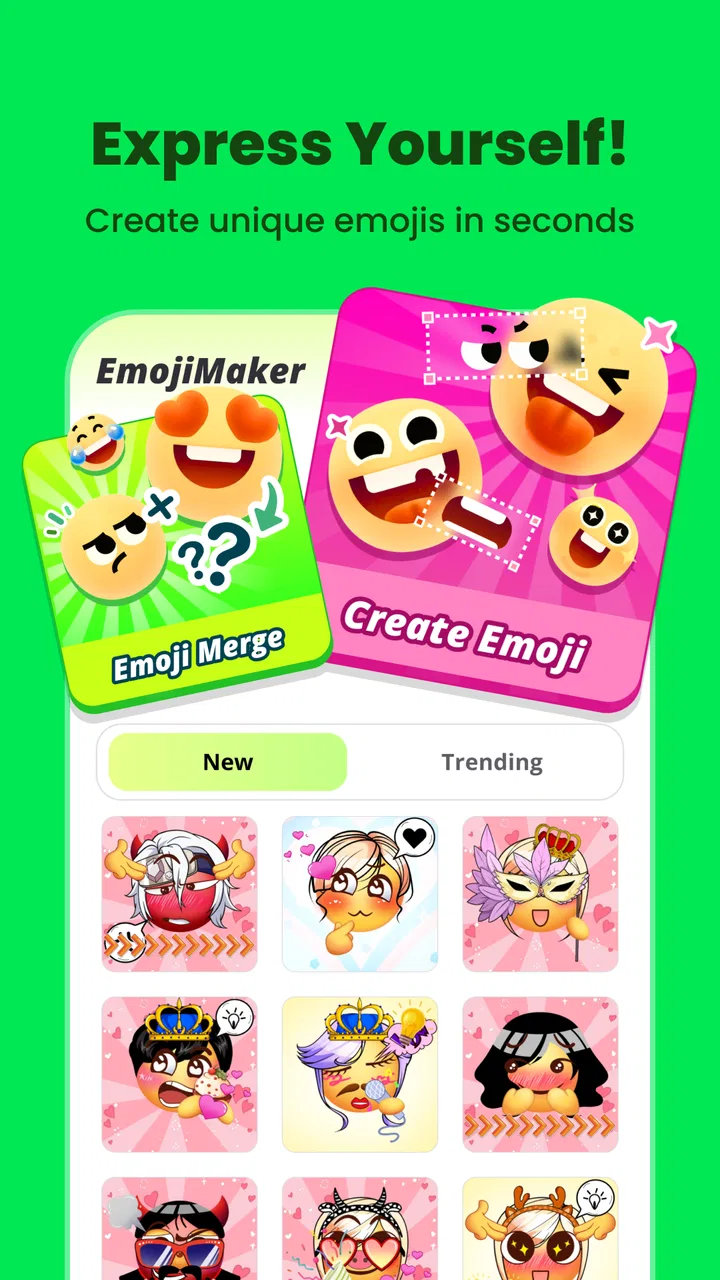
Gemoji - Emoji Maker Sticker is an app that allows users to create personalized emojis and stickers. With a variety of customization options, you can design unique emojis that reflect your personality and style. The app offers a user-friendly interface for both Android and iOS platforms, making it accessible to a wide audience.
02How do I create a custom emoji using Gemoji?
Creating a custom emoji with Gemoji is simple. Start by selecting a base emoji template, then customize it with various features such as hairstyles, expressions, accessories, and more. The intuitive drag-and-drop interface makes it easy to experiment with different combinations until you achieve the desired look.
03Is Gemoji free to use, and are there in-app purchases?
Gemoji is free to download and use, offering a range of basic features at no cost. However, the app includes in-app purchases for premium features, such as exclusive templates and special effects. These can enhance your emoji creation experience, but they are entirely optional.
04Can I use my created emojis in messaging apps?
Yes, Gemoji-designed emojis can be used in various messaging apps. After creating your emoji, you can save it to your device and then share it via popular messaging platforms like WhatsApp, Messenger, and iMessage, allowing for fun and personalized communication with friends and family.
05What are the system requirements for installing Gemoji?
To install Gemoji, your device must meet certain system requirements. For Android users, a device running Android 5.0 (Lollipop) or later is needed. iOS users will require iOS 10.0 or later. These requirements ensure optimal performance and access to all features within the app.
Pros
- Highly customizable emoji options.
- User-friendly interface design.
- Wide variety of sticker packs.
- Regular updates with new content.
- Easy sharing across platforms.
Cons
- Limited free features available.
- Occasional in-app ads disrupt flow.
- Some designs can feel repetitive.
- Requires internet for full access.
- Subscription can be pricey for some.

Gemoji - Emoji Maker Sticker
Gallery